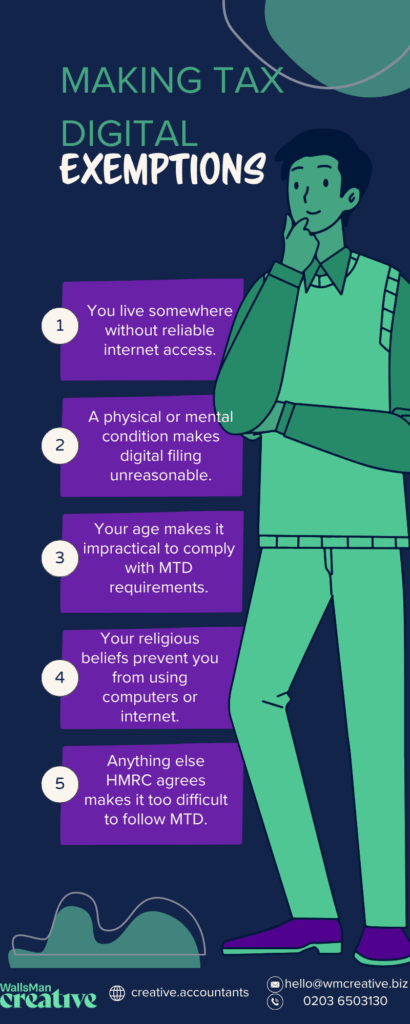
HMRC only allows Making Tax Digital exemptions if you meet one of three strict criteria:
- It’s not practical for you to use digital tools – because of age, disability, or where you live.
- Your religious beliefs prevent you from using computers or the internet – this has to be part of your faith’s teachings, not just a personal stance.
- You have a reasonable excuse – a specific situation that makes it genuinely impossible to comply.
If you don’t fall into one of these categories, HMRC expects you to follow MTD rules. Getting approved of Making Tax Digital exemptions isn’t about personal preference or convenience, you actually have to have a solid reason for it.
Key Takeaways
- Exemptions are only allowed if MTD is not practical (age, disability, no internet), religious beliefs prevent digital use, or there’s a reasonable excuse (illness, crisis, emergency).
- You must clearly explain and provide evidence when applying.
- If approved, you can keep paper records and skip MTD software.
- If rejected, you must comply with MTD immediately.
Table of contents
1. What counts as “not practical” for Making Tax Digital?
From the three strict rules, this is the most common reason people apply for an exemption – and the most strictly checked by HMRC.
You might qualify if:
- You have a physical or mental condition that makes using a computer or software difficult or impossible.
- You live in a remote area with no reliable broadband or mobile signal.
- Your age or level of digital literacy means you’re unable to use online systems, even with help.
Keep in mind that HMRC looks at each case individually.
You’ll need to explain clearly why using digital tools isn’t realistic for you – and back it up with evidence where possible (like a doctor’s note or proof of no internet access).
If you’re only willing to say “I don’t like using computers”, that won’t be enough.
2. Religious objections as exemption from MTD
If your religious beliefs prevent you from using computers or the internet, you can apply for an exemption.
HMRC will only accept this reason if:
- Your objection is based on the core teachings or practices of your religion.
- You can explain how your beliefs directly conflict with digital record-keeping or online filing.
This isn’t about personal choice or discomfort with technology. It needs to be a clearly religious restriction – for example, some communities avoid all forms of modern tech as a matter of faith.
Be prepared to outline your reasons in plain language for HMRC. You don’t need legal wording, but you need an honest explanation of how your beliefs apply.
3. Reasonable excuses to be exempt from MTD
This is HMRC’s flexible category for unusual or temporary situations that prevent you from meeting MTD requirements.
Examples that might qualify:
- You’re seriously ill or recovering from surgery, and can’t manage digital submissions right now.
- A recent bereavement or personal crisis has made it impossible to keep up.
- An emergency, like a flood, fire, or other disruption has damaged your records or equipment.
These cases are assessed individually, just like the “not practical” section.
You’ll need to explain your situation clearly and include any evidence you can, for example:
- a hospital letter
- death certificate
- insurance report.
Keep in mind: this type of exemption is usually short-term. HMRC may expect you to comply with MTD once your situation changes.
4. How to apply for an exemption
Applying is straightforward, but you need to be precise. If you have any questions for Making Tax Digital exemptions, feel free to reach out to WallsMan Creative.

Choose your method
You can apply online through the gov.uk website, or by calling HMRC directly.
Specify the tax
Tell HMRC which tax the exemption applies to – MTD for VAT, MTD for Income Tax Self Assessment (ITSA), or both.
Explain your situation
Write a clear, simple explanation of why you can’t follow MTD rules. Include supporting documents if you have them, depending on what kind of your exemption you apply for, you can include:
- a medical note
- internet speed test
- written statement about your beliefs.
Wait for HMRC’s decision
You’ll get a written response.
Until then, you’re expected to comply as normal. So, keep records and try to stay on top of deadlines.
| Creative Tip Always keep a copy of what you submit. HMRC may come back with questions later. |
5. What happens if your exemption is approved?
If HMRC agrees with your application, you’ll be allowed to submit returns in a non-digital format.
What does this mean?
- You won’t need to keep digital records
- You can file your returns using paper forms or simpler methods
- You won’t be penalised for not using MTD-compatible software
The exemption only applies to the specific tax you applied for. So, if you’re exempt from MTD for Income Tax, you might still need to follow MTD rules for VAT.
Also, exemptions aren’t always permanent.
HMRC can check in later to see if your situation has changed. If it has, you may need to rejoin MTD in which case, you can check out how to register for MTD.
6. What to do if rejected?
If HMRC doesn’t approve your exemption, you’ll need to start complying with Making Tax Digital:
- Keeping your records digitally – spreadsheets, apps, or accounting software
- Using MTD-compatible software to file your returns
- Following MTD rules from the date HMRC sets – often the next return due
It’s important not to ignore the decision! You won’t be fined straight away, but an HMRC penalty can build up if you delay, and they take the MTD penalties seriously.
If tech isn’t your thing, consider working with a bookkeeper or accountant who can handle MTD for you. There are also free or low-cost software options, so you can check out MTD for landlords or sole traders, depending on what you need.
7. Check MTD requirements with WallsMan Creative
Making Tax Digital exemptions are only granted when you can show there’s a barrier preventing you from complying.
The key in every case is clarity and evidence.
If you’re unsure about qualifying, don’t leave it to chance.
Understand the criteria, prepare your application carefully, and keep a record of everything you send.
The system can be complex, but with the right support, it doesn’t have to be overwhelming, that’s why we’re here!